Can I add more SSD storage to my VPS or VDS/Dedicated Server?
Yes. Whether you are on a VPS, Dedicated Server, or VDS, there are options to increase your SSD storage. The process differs depending on your product type.
VPS: Extend SSD Storage via the Customer Control Panel
If you have a Cloud VPS, you can extend your SSD storage directly in the Customer Panel.
How to extend your VPS SSD storage
- Log in to the Customer Control Panel at my.contabo.com.
- Navigate to your VPS and click Extend SSD Storage.
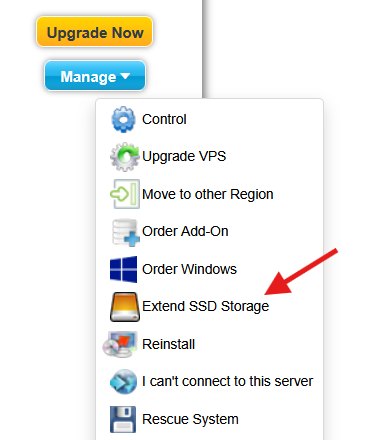
- You will be shown the pricing for the extension. Example: adding 200 GB costs €2.45 per month (on top of your existing VPS price).
- If you agree to the price, confirm the payment. The amount will be charged immediately using the payment method on your account, and the additional storage will be activated right away.
Please note: The storage extension and the exact price depends on your VPS plan. If you need significantly more storage than the extension provides, consider upgrading to a larger VPS plan or looking into a Storage VPS (see below).
VDS and Dedicated Servers: Contact Support
For VDS and Dedicated Servers, adding more SSD storage is not available as a self-service option. Please contact Contabo support by opening a ticket via the Customer Control Panel, and the team will advise on the available options for your specific plan.
Need a Larger amount of SSD Storage? Consider a Storage VPS
If you require a large amount of SSD storage, Contabo also offers dedicated Storage VPS plans, which are specifically designed for high-capacity storage needs. You can find the available plans on the Contabo website: contabo.com/en/storage-vps/.
I chose SSD - can I switch to NVMe?
VPS customers: Yes, you can upgrade to an NVMe plan directly via the Upgrade now option in the Control Panel. (Your services on the left hand side - Upgrade Now)
Please be aware that this involves a server reinstallation, so make sure to back up your data beforehand.
VDS and Dedicated Server customers: Yes, but this requires contacting Contabo support. A storage type change requires a reinstallation of your server, which will erase all existing data. Please back up your data before requesting this change.
Note: Object Storage is a Separate Product
If you are looking to increase capacity for Object Storage (S3-compatible buckets), that is handled differently. See Can I Increase My Storage Capacity for an Existing Object Storage Plan?
Still need help? Contact support
Was this article helpful?
That’s Great!
Thank you for your feedback
Sorry! We couldn't be helpful
Thank you for your feedback
Feedback sent
We appreciate your effort and will try to fix the article
